.png)
Retopology Explained: Clean Topology for Scanned Digital Humans, Rigging and Real-Time

Retopology is the process of rebuilding a 3D model's surface with a new, clean and organised mesh that keeps the original shape.
Raw 3D scans and high-detail sculpts look impressive, but they are rarely usable as they are. A head scan can contain millions of uneven triangles. A sculpt can contain tens of millions of polygons. Neither will rig, animate, texture or run in an engine the way a production character must.
Retopology solves this by placing a lighter mesh of well planned quads over the detailed surface. Fine detail is then carried across as texture maps, so the character keeps its realism while gaining a structure that bends and performs correctly.
At Mimic Productions, retopology is the bridge between capture and performance. It turns scanning and sculpting data into characters that can be rigged, driven by motion capture and delivered in real time. This guide explains how it works and why it matters so much for digital humans.
Table of Contents
What Is Retopology?

Topology is the layout of a mesh: where its vertices sit, how its edges connect and how its faces flow across the surface. Retopology is the act of redrawing that layout.
The artist keeps the original high-detail model as a reference and builds a new surface on top of it. Every new vertex snaps to the original shape, so the silhouette and proportions stay the same. What changes is the structure underneath.
A good retopologised mesh is:
Lighter, often by a factor of hundreds or thousands
Made mostly of four-sided polygons, called quads
Organised in loops that follow muscles and joints
Even in density, with extra resolution only where it is needed
Ready for UV mapping, rigging and animation
Retopology is one stage of a wider modelling workflow, covered in our guide to 3D character modeling.
Why Scans and Sculpts Need Retopology

Scanning and sculpting are designed to capture detail, not to animate.
A photogrammetry scan reconstructs a surface from hundreds of photographs. The result is accurate, but its triangles fall wherever the software placed them. There is no logic to how they flow around an eye or a mouth. A digital sculpt has a similar problem: it is dense, uniform and built for detail rather than motion.
Using that raw mesh directly causes problems:
Bad deformation: random triangles pinch, stretch and crease when joints bend
Heavy files: millions of polygons slow every tool and break real-time budgets
Hard texturing: messy surfaces produce distorted, fragmented UV layouts
Weak rigs: skin weights and blend shapes have nothing clean to follow
No reuse: each scan has a different layout, so characters cannot share rigs or animation
This is why every 3D body scanning project includes a cleanup and retopology stage before the character moves anywhere else in the pipeline.
What Good Topology Looks Like

Good topology is not about looking neat. It is about how the mesh behaves when it moves.
The key principles are:
Quads first: four-sided faces subdivide cleanly and deform predictably
Edge loops follow form: loops wrap around joints, eyes and mouth so they can open, close and bend
Density where motion happens: elbows, knees, shoulders and the face need extra loops, flat areas need fewer
Controlled poles: points where three or five edges meet are placed where they will not cause visible pinching
Even spacing: consistent polygon size keeps textures and simulations stable
Joints are the clearest test. A knee or elbow needs enough loops to hold volume as it bends, otherwise the skin collapses like a folded straw. The same mesh must also look good at rest and under extreme poses, which is why topology and body and facial rigging are planned together.
Face Topology for Digital Humans

The face is where topology matters most. It carries speech, emotion and the small movements audiences read instantly.
Production face topology follows the muscles underneath the skin:
Eye loops: circular rings around each eye let lids blink and squint without tearing
Mouth loops: rings around the lips allow opening, puckering and smiling
Nasolabial lines: edges that follow the fold from nose to mouth corner let smiles crease naturally
Forehead and brow flow: horizontal lines support raising and furrowing
Jaw and neck flow: clean transitions keep the jaw opening believable
These loops are what make facial animation possible. Every blend shape and facial joint relies on vertices sitting in the right places. When the face is scanned, studios often retopologise the neutral pose once, then wrap that same topology onto every scanned expression so all shapes share an identical vertex layout. Our guide to 3D face scanning explains how those expressions are captured.
Manual, Automatic and AI Retopology

There are three main ways to rebuild a mesh, and most studios use a mix.
Manual retopology means an artist places every edge, using snapping tools in Maya, Blender, 3ds Max, ZBrush or TopoGun. It is the slowest method but gives full control over loops, poles and density. It remains the standard for hero faces and characters that will be seen close up.
Automatic retopology uses algorithms such as ZRemesher, Quad Remesher or Blender's remesh tools. The artist sets a target polygon count and guide curves, and the software produces a quad mesh in minutes. Results are good for props, clothing and background characters, but loops around eyes and mouth often need hand correction.
AI and template-based retopology wraps a known, tested base mesh onto a new scan. Instead of building topology from scratch, the system fits a pre-made head or body to the scanned shape. This keeps every character on the same layout, which means rigs, blend shapes and animation can be shared. Machine learning tools are also starting to predict topology directly from scans.
For digital humans, the template approach is often the most efficient: it combines the speed of automation with the deformation quality of a hand-built mesh.
How Studios Retopologise a Scanned Character

A production retopology pass follows a clear sequence.
Step 1: Clean the source
Holes are filled, noise is reduced and the scan is aligned and scaled. A clean reference makes every later stage faster.
Step 2: Choose a base mesh or build from scratch
If the studio has a tested template for heads and bodies, it is wrapped to the scan. Unique creatures or stylised characters are built by hand.
Step 3: Refine loops and density
Artists correct eye, mouth and joint loops, move poles and add resolution where the character will deform most.
Step 4: UV map the new mesh
The clean mesh is unwrapped into a flat UV layout. Good topology makes this much easier and gives textures room where the camera will look.
Step 5: Bake detail from the high-resolution source
Pores, wrinkles and fine forms are transferred into normal and displacement maps. The light mesh then looks almost as detailed as the original. Our guide to 3D character texturing and skin realism covers what happens next.
Step 6: Test deformation
The mesh is rigged and posed through extreme ranges of motion before it is approved. Problems are cheaper to fix here than after animation starts.
Comparison Table
Method | How it works | Best for | Main limitation |
Manual retopology | Artist places every edge over the high-detail model | Hero faces, close-up digital humans | Slowest, needs experienced artists |
Automatic remeshing | Algorithm generates quads to a target count | Props, clothing, background characters | Facial loops often need hand fixes |
Template wrapping | Tested base mesh fitted to each new scan | Digital human libraries, shared rigs | Needs a strong base mesh first |
AI retopology | Trained models predict topology from scans | Fast first passes at scale | Still maturing for production faces |
Decimation only | Polygons reduced without rebuilding layout | Static scans, previews, 3D printing | Not suitable for animation |
Polygon Budgets for Film, Games and Real-Time
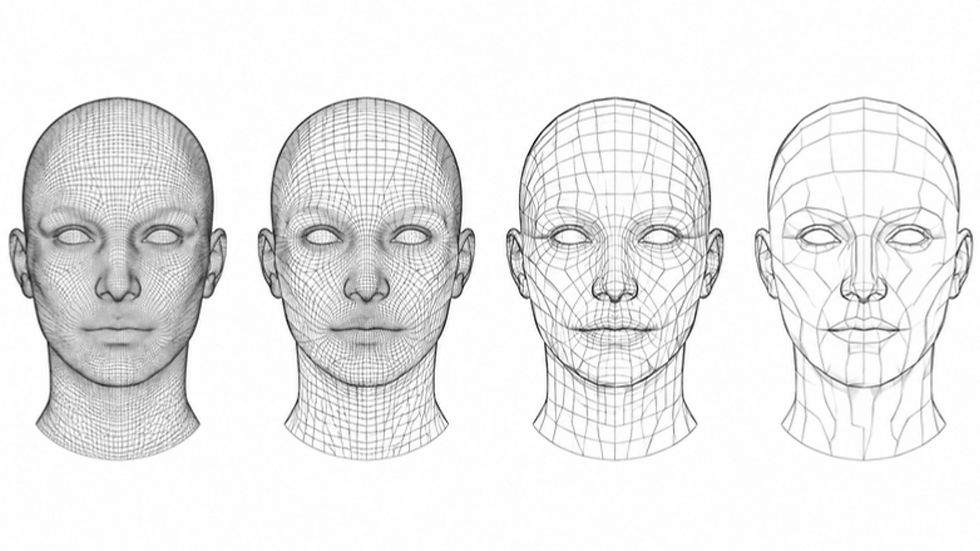
Retopology is also where the character is fitted to its destination. The same performer may need several versions:
Film and VFX: higher base meshes that subdivide at render time, with displacement for detail
Game hero characters: carefully balanced meshes with detail in normal maps
Real-time digital humans: budgets tuned for Unreal Engine, Unity or web, often with several levels of detail
Mobile, AR and web: the lightest meshes, where every polygon counts
Levels of detail, or LODs, are lighter copies of the same mesh that swap in as the character moves further from the camera. Clean topology makes them much easier to build and keeps the silhouette consistent between levels. Real-time specifics are covered in rigging for real-time, and engine delivery in our real-time integration service.
The Future of Retopology

Retopology is changing fast, but its purpose stays the same: give a detailed shape a structure that performs.
Expect to see:
AI retopology that produces animation-ready quads with correct facial loops
Template systems that fit one tested topology to any scanned person in minutes
Engines that handle far denser meshes, reducing the need for aggressive reduction
Neural and Gaussian splat captures converted directly into rig-ready meshes
Tighter links between topology, rigging and automatic skin weighting
Faster tools will not remove the need for judgement. Someone still has to decide where a face needs to fold, how a character will be seen and what the final platform can carry. That is why retopology remains a core part of 3D character services rather than a button at the end of a scan.
Frequently Asked Questions
What is retopology in 3D?
Retopology is rebuilding a 3D model's surface with a new, cleaner mesh that keeps the original shape. It turns dense scans or sculpts into lighter, organised geometry that can be textured, rigged and animated.
Why is retopology needed?
Scanned and sculpted meshes are too dense and too irregular to animate well. Retopology reduces the polygon count and arranges edges so the model deforms correctly and runs efficiently.
What makes good topology for animation?
Mostly quads, edge loops that follow muscles and joints, extra density where the mesh bends and careful placement of poles. The test is how well the mesh holds its shape under extreme poses.
Is automatic retopology good enough?
For props, clothing and background characters it often is. For hero faces and close-up digital humans, automatic results usually need manual correction around the eyes, mouth and joints.
What is the difference between retopology and decimation?
Decimation only removes polygons and keeps a messy layout. Retopology rebuilds the layout with clean loops, which is what animation needs.
How long does retopology take?
A prop can take minutes with automatic tools. A production-quality head or full digital human can take from a day to several days by hand, or much less when a tested template mesh is wrapped to the scan.
Does retopology lose detail?
The new mesh is lighter, but fine detail is baked from the original into normal and displacement maps. The final character looks almost identical to the high-resolution source.
Which software is used for retopology?
Common tools include Maya, Blender, 3ds Max, ZBrush with ZRemesher, TopoGun, 3DCoat and Wrap. Studios choose based on the pipeline and the type of character.
Conclusion
Retopology is the quiet step that makes digital humans work.
Scans and sculpts capture what a person or character looks like. Retopology decides how that shape will move, how it will be textured and whether it can run on the target platform. Clean loops around the eyes and mouth, sensible density at the joints and a shared topology across expressions are what allow rigging, blend shapes and motion capture to perform at their best.
Treat topology as a production decision, made early and tested under motion, and every stage that follows becomes faster and more reliable.
For inquiries, please contact: Press Department, Mimic Productions info@mimicproductions.com


Comments