.png)
What Is Subsurface Scattering? The Secret Behind Realistic Digital Human Skin

Why can a beautifully modeled digital face still look like plastic the moment it is rendered?
The answer is often not in the geometry. It is in the way light interacts with the skin.
Human skin does not behave like an opaque painted surface. When light reaches the face, some of it reflects immediately, but another portion enters the tissue. That light travels beneath the surface, interacts with layers containing melanin, blood, water, and tissue, then emerges somewhere else.
This phenomenon is called subsurface scattering.
It is one of the most important elements in believable digital human rendering because it gives skin its sense of depth, softness, translucency, and living colour. Without it, even an accurate face scan with detailed pores and strong textures can appear hard, synthetic, or mannequin like.
In a professional character pipeline, realistic skin therefore depends on more than a colour texture. Geometry, displacement, roughness, specular response, surface normals, tissue scattering, lighting, camera exposure, and rendering all contribute to the final image.
Studios building photorealistic 3D character models have to consider these systems together because skin realism is created by their interaction, not by any single map or shader control.
This article explains what happens beneath the surface of digital skin, why ears glow under backlighting, how Arnold and Blender handle skin transport, why games use different solutions from feature film rendering, and why a physically informed material still requires careful artistic calibration.
Table of Contents
What Is Subsurface Scattering?

Subsurface scattering is the transport of light beneath the surface of a material before that light exits from another location.
Consider a simple opaque surface. Light strikes one point and the renderer calculates how much is reflected toward the camera.
Skin is more complicated.
A portion of the illumination penetrates the surface. Inside the tissue, photons can be absorbed or redirected many times. The surviving light eventually leaves through another point on the skin.
That spatial movement changes the appearance of both colour and illumination.
Autodesk describes the effect in Arnold as light entering an object, scattering beneath its surface, undergoing absorption, and eventually returning through the surface. Arnold treats the effect as essential for materials including skin, wax, marble, leaves, and milk.
The result is not simply transparency.
Skin remains visually dense, yet illumination travels through its shallow internal structure. This produces softened shadow transitions, colour bleeding beneath the surface, and the characteristic warm response visible around thin tissue.
For digital humans, that distinction is fundamental.
How Light Actually Travels Through Human Skin

A useful way to understand skin shading is to follow the light.
Light reaches the outer skin surface
Some illumination reflects directly from the outer surface. This contributes to specular highlights and the slightly oily response often seen around the forehead, nose, cheeks, and lips.
Some light enters the tissue
Another portion crosses beneath the outer surface instead of reflecting immediately.
At this stage, the light begins interacting with the optical properties of the tissue.
Light scatters below the surface
Inside the skin, light changes direction repeatedly.
Different wavelengths do not behave identically. Red light generally travels farther through skin than green or blue light, which is one reason many production shaders expose separate scattering distances for red, green, and blue channels.
Blender, for example, allows the scattering radius to be controlled individually for RGB channels and specifically notes skin as a material where red light penetrates farther.
Some light is absorbed
Not every photon returns.
Melanin, haemoglobin, and other biological components absorb portions of the incoming spectrum. The amount and wavelength of this absorption contribute significantly to perceived skin colour.
Remaining light exits elsewhere
The light that survives eventually leaves the tissue, often some distance from its original entry point.
This redistribution is what gives skin its characteristic softness.
The renderer is therefore not merely calculating the colour at one surface point. It is approximating or simulating light transport through a material volume.
Why Skin Looks Plastic Without Subsurface Scattering

Plastic looking CGI skin is rarely caused by one mistake.
Several problems can contribute:
Excessively uniform roughness
Weak pore and microstructure detail
Incorrect specular intensity
Flat base colour
Overly smooth geometry
Poor displacement
Incorrect lighting
Missing or badly calibrated tissue scattering
When subsurface behaviour is absent, however, an especially recognizable problem appears.
Light stops too abruptly.
A shadow boundary becomes harder than expected. Highlights and diffuse illumination appear disconnected. The cheeks lack soft internal colour transport. The nose and ears remain unnaturally opaque under strong light.
The renderer begins describing a painted shell rather than biological tissue.
At the opposite extreme, too much scattering creates another familiar failure: wax.
Fine facial structure becomes visually diluted. Shadow boundaries spread too far. Red illumination travels excessively through the face. Features lose definition.
Good digital skin sits between these extremes.
The objective is not to maximize the effect. It is to reproduce a controlled amount of wavelength dependent light transport at the physical scale of the character.
That is why dedicated 3D rendering services treat skin as a complete lighting and material problem rather than simply increasing a single shader parameter.
Why Skin Cannot Be Represented by a Flat Colour Map

A colour map is important, but it represents only one part of skin appearance.
If the face is given a photographic colour texture and rendered using a simple opaque diffuse shader, much of the complexity captured in the photograph is being treated incorrectly.
The texture may contain pigmentation, freckles, veins, redness, uneven tone, and other information. But real skin changes appearance depending on lighting direction, wavelength, viewing angle, tissue thickness, moisture, and surface structure.
A photograph also contains lighting information unless it has been carefully processed or captured through a controlled texture acquisition workflow.
Production skin materials therefore separate different visual properties so the renderer can reconstruct them under new lighting.
This separation is crucial for digital doubles.
A character that looks correct only under the lighting used during scanning or photography is not truly production ready. A robust material should remain convincing when placed under a warm sunset, a hard studio key, an LED wall, an overcast environment, or a dark cinematic interior.
That flexibility is central to professional 3D character services, where assets must survive different shots, cameras, lenses, environments, and rendering contexts.
What Happens in Ears, Fingers, Noses, and Other Thin Areas

Thin tissue makes internal light transport particularly visible.
Place a bright source behind a real ear and it begins to glow. The effect is usually strongest around thinner cartilage and tissue regions where light has less distance to travel before reaching the camera facing side.
Similar behaviour may appear around:
Ears
Nostrils
Fingertips
Eyelids
Lips
Thin parts of the nose
This does not mean the entire head should become translucent.
One of the major challenges of digital human shading is maintaining structure in thick regions while allowing convincing transmission and scattering in thinner areas.
Unreal Engine documentation makes a useful distinction here. Its dedicated Subsurface Profile model is optimized for skin, while stronger backscattering is described as a more secondary effect that becomes especially noticeable in regions such as the ears.
The artist therefore needs to consider tissue thickness, scattering distance, profile behaviour, lighting direction, and masking rather than treating the whole face uniformly.
The Texture Maps Behind Realistic Digital Skin

There is no universal map list that applies identically to every renderer, but a high quality digital human commonly relies on several channels working together.
Base colour or albedo
This provides the underlying pigmentation information.
Ideally, it should be captured or processed so that unwanted directional illumination and specular reflections are minimized.
Roughness
Skin is not equally glossy everywhere.
The nose, forehead, lips, cheeks, pores, facial hair regions, and dry tissue can all produce different surface responses.
A uniform roughness value often makes a face immediately feel synthetic.
Normal map
Normal information represents small surface orientation changes without requiring every detail to exist as explicit geometry.
It is useful for fine wrinkles and skin breakup.
Displacement
Displacement physically modifies the rendered surface and is valuable for pores, wrinkles, folds, scars, and larger skin forms where silhouette or shadow response matters.
Specular response
The outer layers of skin reflect light before it penetrates deeper tissue.
Controlling this response is essential because excessive specularity makes skin look wet or plastic, while too little can make it appear dry and chalky.
Subsurface colour or scattering parameters
These control how light behaves beneath the surface.
Depending on the renderer, artists may work with scattering colour, radius, scale, mean free path, anisotropy, or a diffusion profile.
Masks
Masks allow scattering and other material properties to vary across different facial regions.
This becomes especially useful around lips, ears, eyelids, facial hair, makeup, or areas with substantially different tissue behaviour.
These maps should not operate as isolated layers. Their relationships need to be evaluated under controlled lighting before the asset enters final shot production.
Arnold Subsurface Scattering for Character Rendering

Arnold is widely used in offline visual effects and character rendering because its material system can model complex light transport while integrating with ray traced production workflows.
Within Arnold Standard Surface, the subsurface component simulates light entering the geometry and scattering internally.
Autodesk notes that Arnold calculates this component using ray traced methods and exposes controls including colour and scattering radius. It also emphasizes that the result is highly dependent on object scale.
That scale dependency is critical.
If a head is modeled or exported at an unexpected unit scale, physically meaningful scattering distances can produce completely incorrect visual results.
A shader may suddenly appear waxy even when its parameter values were reasonable in another scene.
Arnold also allows scattering radius to differ between colour channels. Autodesk specifically describes skin as a case where the red component can use a longer radius than green and blue.
This reflects the broader optical behaviour artists are attempting to reproduce: different wavelengths travel through tissue differently.
Arnold rendering also illustrates why physically based character work cannot be reduced to a single material preset.
The final result depends on:
Correct scene scale
Mesh integrity
Surface normals
Scattering radius
Skin pigmentation textures
Specular response
Roughness
Displacement
Lighting
Sampling quality
Camera and colour management
A technically correct shader can still look wrong if the capture or lighting pipeline feeding it is inconsistent.
Blender Subsurface Scattering for Digital Humans
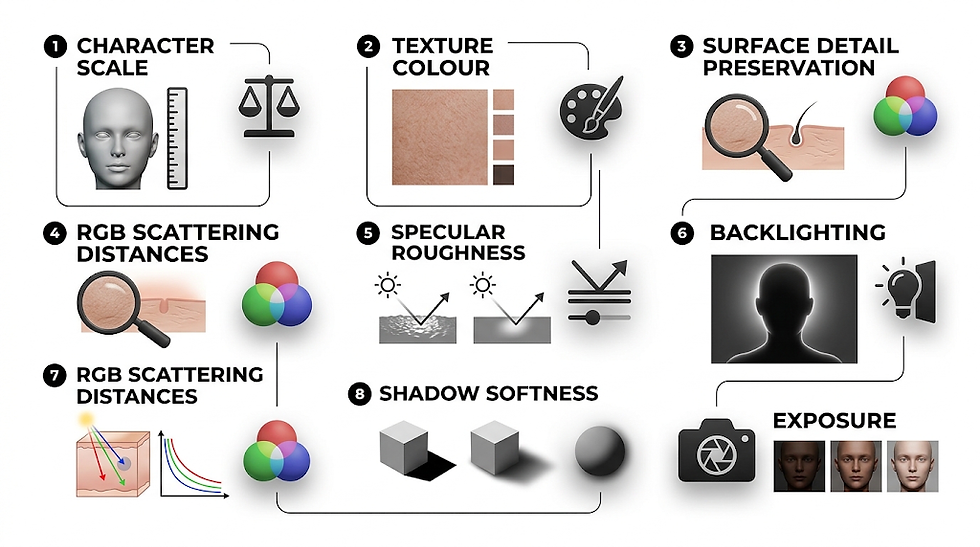
Blender includes skin scattering controls within the Principled BSDF system.
Current Blender documentation provides several subsurface methods, including Christensen Burley, Random Walk, and Random Walk Skin in Cycles. Random Walk Skin is specifically designed around skin rendering and adjusts scattering behaviour in relation to colour texture while aiming to retain surface detail.
The scattering radius defines the average distance light travels beneath the surface.
A larger radius produces broader diffusion.
A smaller radius keeps the skin response tighter.
The important point is that a believable Blender skin shader cannot be created simply by increasing the subsurface weight until the face looks softer.
Artists need to judge:
Character scale
Texture colour
RGB scattering distances
Surface detail preservation
Specular roughness
Backlighting
Shadow softness
Exposure
For high resolution portraits, even small changes can have significant perceptual consequences.
Subsurface Scattering in Games

Yes. Subsurface scattering is used extensively in video games.
The difference is computational budget.
A film renderer can spend substantial computation evaluating light paths for individual frames. A game engine may need to produce dozens or hundreds of frames every second while also calculating animation, physics, particles, environments, shadows, artificial intelligence, and gameplay.
Real time engines therefore tend to approximate the visual result more efficiently.
Unreal Engine includes dedicated Subsurface and Subsurface Profile shading models. Epic describes the Profile model as its higher quality solution for human skin and implements the effect using screen space processing.
Rather than reproducing every physical interaction inside the skin, the renderer solves for the perceptually important result within an interactive performance budget.
That compromise is central to real time integration.
A character intended for Unreal, XR, interactive installations, or live virtual production cannot simply inherit a film shader unchanged. Its material architecture, texture resolution, geometry density, lighting response, and rendering cost all need to be designed for the target system.
Offline Rendering Compared With Real Time Rendering
Production Factor | Offline Rendering | Real Time Rendering |
Primary priority | Maximum image fidelity | Image quality within strict frame budgets |
Typical context | Film, VFX, cinematic advertising | Games, XR, interactive digital humans, virtual production |
Skin light transport | Can use expensive ray traced scattering solutions | Often uses efficient approximations or screen space diffusion |
Sampling budget | Potentially very high per frame | Limited by target frame rate and hardware |
Fine skin detail | Can preserve extremely dense displacement and shading complexity | Must balance pore detail with texture and geometry budgets |
Iteration goal | Final pixel accuracy | Stable quality during interactive motion |
Typical renderer | Arnold and other path tracing systems | Unreal Engine and similar interactive engines |
Does Dark Skin Require Different Subsurface Scattering Settings?

Potentially, but the correct approach is not simply to assign more or less scattering according to skin tone.
Human pigmentation changes the way light is absorbed before and during its journey through tissue.
Research measuring different human skin phototypes has found that darker pigmentation is associated with increased absorption and effective attenuation in the visible spectrum, while optical penetration decreases. One study also reported similar scattering coefficients across its sample groups, illustrating why pigmentation, absorption, and scattering should not be collapsed into a single artistic slider.
Melanin is especially important because it strongly influences the amount and spectrum of light penetrating the epidermis.
The practical implication for digital human production is straightforward.
A skin shader should be calibrated to the individual subject rather than built around an assumed universal complexion.
Epic's documentation, for example, notes that its default skin profile is close to a light Caucasian skin reference and explicitly advises artists to ensure that base colour and the scattering profile correspond appropriately.
For a diverse digital human pipeline, default values should therefore be treated as starting points, not biological standards.
Artists should evaluate reference photography, captured albedo, pigmentation, lighting response, anatomical region, and material scale together.
This is also where high quality capture matters. A shader cannot recover skin information that was badly photographed, incorrectly colour managed, or baked together with uncontrolled illumination.
Three Renders That Reveal Whether Skin Shading Is Correct

A useful original visual asset for this subject is a controlled three image comparison using exactly the same character, camera, light, exposure, textures, and geometry.
Only the subsurface parameters should change.
Render One: No Subsurface Scattering
The first render should disable tissue scattering.
Expected appearance:
Harder light transitions
Reduced warmth around thin tissue
Less believable cheeks
Opaque ears
Greater tendency toward a plastic or painted surface
The image demonstrates that texture detail alone does not create living skin.
Render Two: Excessive Subsurface Scattering
The second render should deliberately exaggerate scattering distance or intensity.
Expected appearance:
Waxy skin
Excessive red bleeding
Lost pore contrast
Softened facial landmarks
Reduced definition around the nose and cheeks
Too much glow under backlighting
This render is especially useful because it shows that SSS is not a realism slider.
More scattering does not mean more realistic skin.
Render Three: Balanced Subsurface Scattering
The final render should use physically plausible scale and carefully tuned scattering.
Expected appearance:
Soft but defined shadow transitions
Preserved pores and wrinkles
Controlled warmth in thin tissue
Convincing ear transmission
Natural cheek response
Clear separation between surface reflection and deeper tissue transport
This comparison would provide stronger educational value than a definition alone because readers can immediately see how light transport changes perceived material quality.
It also reflects how skin is actually evaluated during VFX production: through controlled visual tests, reference matching, lighting changes, and shot level review.
Applications

Subsurface skin rendering appears across many character production environments.
Film and television
Digital doubles and synthetic characters often appear beside photographed actors.
Skin shading must therefore survive close scrutiny under cinematic lighting and compositing.
Games
Playable characters require convincing tissue response while remaining inside strict performance limits.
Virtual production
Characters may need to respond immediately to changing cameras, lighting conditions, and stage environments.
XR
Head mounted displays can place viewers unusually close to virtual faces, exposing shading errors that may be less noticeable in a conventional wide shot.
AI driven digital humans
Interactive characters need believable skin under dynamic environments while supporting facial animation, speech, eye movement, and real time rendering.
Advertising and fashion
Photoreal virtual talent often appears in controlled beauty imagery where surface detail, colour fidelity, and specular behaviour are highly visible.
Benefits

Correct skin scattering contributes to realism in several interconnected ways.
Greater sense of biological depth
The face stops reading as a thin painted shell and begins to exhibit internal material structure.
Softer light transitions
Illumination spreads beneath the surface, giving shadows and colour transitions a more natural character.
Better response to backlighting
Thin areas such as ears and nostrils can respond convincingly when illuminated from behind.
More coherent skin colour
Pigmentation, vascular colour, and lighting interact rather than appearing as a static texture pasted onto geometry.
Stronger integration with cinematic lighting
A carefully built skin material adapts more convincingly as the lighting setup changes.
Better digital double fidelity
Accurate geometry is only part of likeness.
When the material responds incorrectly, viewers often perceive the entire face as artificial even when they cannot identify the technical reason.
Future Outlook
Skin rendering continues to move toward greater physical accuracy while becoming practical in faster production environments.
Offline renderers increasingly provide sophisticated random walk and volumetric scattering methods.
Blender already includes a Random Walk Skin option designed specifically for skin, while Arnold provides detailed ray traced subsurface controls.
At the same time, real time engines continue to improve their ability to preserve subtle skin detail while maintaining interactive performance.
Unreal's Subsurface Profile system demonstrates this direction by focusing computation on the characteristics most perceptually important for human skin.
The larger change will be in acquisition and calibration.
Better scanning, spectral capture, polarized photography, machine assisted texture processing, and measured skin data can give artists more reliable inputs before the shading stage even begins.
The long term goal is not to remove artistic judgement.
It is to give artists better physical evidence.
A renderer can calculate complex light transport, but the result still needs to match a person, a shot, a camera, a lighting environment, and a creative intention.
That combination of measurement and judgement remains at the centre of believable digital humans.
Frequently Asked Questions
What is subsurface scattering?
Subsurface scattering is the process by which light enters a material, travels and scatters beneath its surface, then exits at another location.
In skin, this behaviour contributes to softness, depth, colour variation, and the warm response visible in thin areas.
Why does skin need subsurface scattering?
Skin is not completely opaque.
Some illumination penetrates the tissue instead of reflecting directly from the surface. Ignoring that light transport makes digital skin appear too hard and can create a plastic or mannequin like result.
Why does CGI skin sometimes look like plastic?
CG skin can look plastic when the material lacks convincing internal scattering, roughness variation, microdetail, displacement, or correct specular behaviour.
Lighting and scale can also reveal errors very quickly.
Is subsurface scattering used in video games?
Yes.
Modern game engines use specialized skin shading techniques to approximate subsurface light transport while maintaining interactive performance.
Unreal Engine includes a dedicated Subsurface Profile shading model intended for high quality human skin.
How is subsurface scattering different in film and real time rendering?
Offline renderers can spend considerably more computation tracing or approximating light movement inside the skin.
Real time engines must calculate the image within a small frame budget, so they frequently use screen space or other optimized techniques that reproduce the most important visual characteristics efficiently.
What is Arnold subsurface scattering?
Arnold's Standard Surface shader includes a subsurface component that models illumination entering geometry and scattering beneath the surface.
Artists can control properties such as colour and scattering radius, and the result depends strongly on correct object scale.
How does Blender subsurface scattering work?
Blender's Principled BSDF provides controls for subsurface light transport, including scattering radius and several calculation methods.
Cycles includes Random Walk Skin, which is specifically designed to improve skin rendering while retaining detailed surface information.
Does dark skin require different subsurface scattering settings?
The material should be calibrated to the individual skin reference rather than adjusted according to a simplistic light versus dark rule.
Melanin alters wavelength dependent absorption, and skin pigmentation can change the depth and spectral character of light transport.
What texture maps are used for realistic digital skin?
Typical digital skin materials may use:
• Base colour or albedo
• Roughness
• Normal maps
• Displacement
• Specular controls
• Scattering colour or radius data
• Regional masks
The exact map set depends on the renderer and production pipeline.
Can a scan automatically create realistic skin?
A scan can provide valuable geometry and texture information, but final skin realism still depends on processing, material reconstruction, shader calibration, lighting, rendering, and quality control.
The strongest results come from treating acquisition and look development as connected stages rather than isolated tasks.
Conclusion
So, what is subsurface scattering in practical character production?
It is the reason digital skin must be treated as tissue rather than paint.
Light does not simply strike the face and bounce away. Some of it enters the skin, interacts with pigmentation and internal tissue, travels beneath the surface, and emerges elsewhere. That behaviour softens illumination, changes colour relationships, produces warmth under backlighting, and gives a rendered face a sense of physical depth.
But realistic skin does not come from enabling SSS and increasing a slider.
It comes from balancing geometry, scale, colour, roughness, displacement, specular response, scattering distance, lighting, and rendering within the requirements of a specific production.
Arnold can spend substantial computation resolving internal light transport for cinematic frames. Blender offers physically informed scattering methods for character rendering. Unreal uses optimized skin shading designed around interactive performance.
The implementation changes.
The underlying principle does not.
For a digital human to feel present under light, the renderer has to account for what happens beneath the skin as carefully as what happens on its surface.


Comments